|
Products:
|
ALL |
|
Version:
|
N/A |
|
Problem:
|
Users need a replacement update disk for various
reasons. |
|
Background:
|
Insurance Visions DOS based software
needs to be updated via floppy disk. |
|
Solution:
|
The instructions below will demonstrate
how to open a ZIP file and create a new floppy disk |
|
What
is needed:
|
|
|
Instructions:
|
- Click
the Link to the ZIP file
- Click
on open ('Open from this location' - Prior versions of IE
or Netscape)
- Insert
the blank floppy disk
- Click
on 'Extract' in the WinZip toolbar

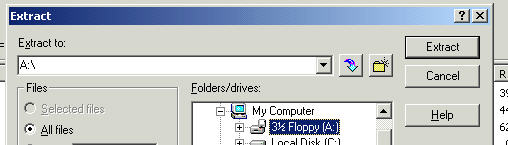
- In
the next window, choose the next options
A. Extract to: = 'A:\'
B. Files = 'All Files'
C. Click on 'Extract'
- Once
the files have been copied to the floppy drive, close WinZip
- Continue
with the Xpress Comp update instruction
|
|
Note:
|
All Files have been scanned with Trend
Micro virus scanner |